

DriveSurge Threat Actor
Original Issue Date:-
July 02, 2026
Virus Type:- Downloader/Dropper
Severity:-
Medium
It has been reported that newly discovered Dropper called DriveSurge is an emerging, large-scale campaign that compromises legitimate websites to redirect users towards malicious infrastructure. Visitors are directed towards malicious infrastructure through an open-source traffic distribution system known as zTDS. These attacks leverage deceptive "ClickFix" prompts and fake browser updates to deploy malware directly onto Windows and macOS systems. This widespread infrastructure supports a "pay-per-install" model by providing threat actors with a steady flow of compromised victims, allowing them to further their malicious activities.
Infection Mechanism:
DriveSurge acts as a sophisticated digital deception platform. Instead of hacking a user directly, it compromises legitimate websites that a user likely visits and trusts. The attack unfolds in two stages: first, the user is unknowingly redirected upon visiting a compromised site; second, the attackers engage the user with one of two specific psychological traps. The ultimate goal is to manipulate the user into helping install malware by pretending to offer helpful solutions.
The "Fake Browser Update":
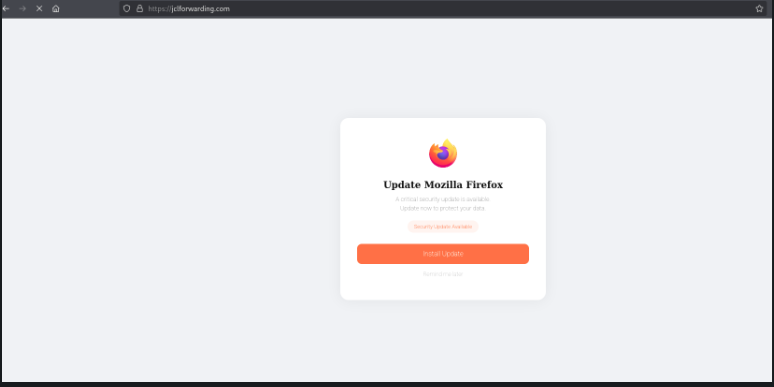
A fake pop-up appears, mimicking an official update notice for browsers like Chrome, Firefox or Edge etc. When the user clicks the "Update" button, the system does not receive a real patch. Instead, the user triggers the download of a harmful file, which installs a malware on the device.
The "ClickFix" Command:
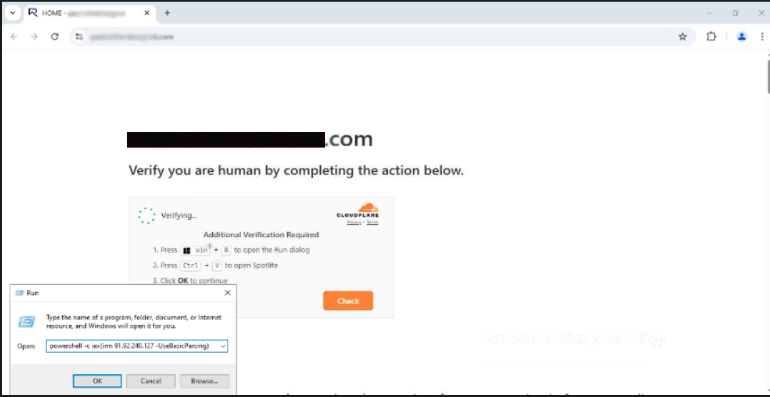
A fake error message appears on the screen, claiming the computer has a technical problem. Attackers trick the user to run the malicious command into the "Terminal" or "PowerShell" window. This action hands the attacker full permission to bypass security, allowing them to install malware directly onto the device.
Indicator of Compromise:
URL:- hxxp://147[.]45[.]42[.]200/ce3cbfc887?force=1
- hxxp://46[.]226[.]166[.]57/ce3cbfc887?force=1
- 7aa15de93cf85729ddf970e8d7897f69ece3ca29608f73e784a9ba40c9cea18d
- 8ecc7108cd679316bf5900e84f19b256dc399902cdede646493f502ac872cc1a
For more detailed list of IoC, kindly refer the below URL:
Best Practices and Recommendations:
- Keep operating systems, web servers, Content Management Systems (CMS), plugins, themes, browsers and other software up to date with the latest security patches.
- Deploy and properly configure a Web Application Firewall (WAF) to detect and block malicious HTTP requests, web shell uploads, script injections and exploitation attempts targeting Internet-facing web applications.
- Regularly monitor website source code and web server files for unauthorized modifications, malicious JavaScript injections, suspicious iframe tags or references to unknown external domains.
- Implement File Integrity Monitoring (FIM) to detect unauthorized creation or modification of website files and web application resources.
- Enforce a strong Content Security Policy (CSP) to restrict execution of JavaScript from untrusted domains and implement Subresource Integrity (SRI) wherever applicable.
- Continuously monitor web server, DNS, proxy, firewall and endpoint logs for indicators of suspicious activities, including access to newly registered domains, abnormal redirects and connections to known malicious infrastructure.
- Deploy Endpoint Detection and Response (EDR/XDR) solutions capable of detecting malicious PowerShell execution, command-line abuse, suspicious browser child processes, script execution and other Living-off-the-Land (LotL) techniques.
- Restrict execution of PowerShell, Windows Script Host (WSH), Command Prompt and other scripting engines through Group Policy or application control mechanisms wherever operationally feasible.
- Implement Application Allowlisting to prevent execution of unauthorized executables and scripts.
- Configure email, web filtering and endpoint security solutions to block downloads of executable files and archives from untrusted or newly observed domains.
- Educate users to download software updates, browser updates and security patches only through official vendor websites or built-in update mechanisms. Users should never execute commands copied from websites or browser pop-ups.
- Block access to malicious and newly registered domains using DNS filtering, Secure Web Gateway (SWG) or enterprise web filtering solutions.
- Enable Multi-Factor Authentication (MFA) for all privileged and administrative accounts and enforce strong password policies.
- Follow the Principle of Least Privilege (PoLP) by restricting administrative privileges and limiting user permissions to only those necessary for their roles.
- Conduct periodic Vulnerability Assessment and Penetration Testing (VAPT) of Internet-facing applications and promptly remediate identified vulnerabilities.
- Maintain regular offline and immutable backups of critical systems and website content to facilitate recovery in the event of compromise.
- Continuously update antivirus, IDS/IPS, SIEM, EDR/XDR and firewall signatures with the latest Indicators of Compromise (IOCs), threat intelligence feeds and detection rules.
- Review Internet-facing websites periodically for unauthorized redirects, injected JavaScript, malicious iframes and suspicious third-party scripts that may facilitate malware delivery.
- If compromise is suspected, immediately isolate the affected system from the network, preserve forensic evidence, remove malicious code, rotate compromised credentials, restore systems from trusted backups and monitor the environment for signs of persistence.
References:
- https://www.silentpush.com/blog/drivesurge
- https://socprime.com/active-threats/drivesurge-uses-clickfix-and-fake-update-drive-by-attacks-at-scale
- https://www.darkreading.com/cyberattacks-data-breaches/drivesurge-hijacks-thousands-sites-clickfix-fakeupdate-attacks
- https://www.bleepingcomputer.com/news/security/hackers-hijack-thousands-of-sites-for-clickfix-and-fakeupdate-attacks/